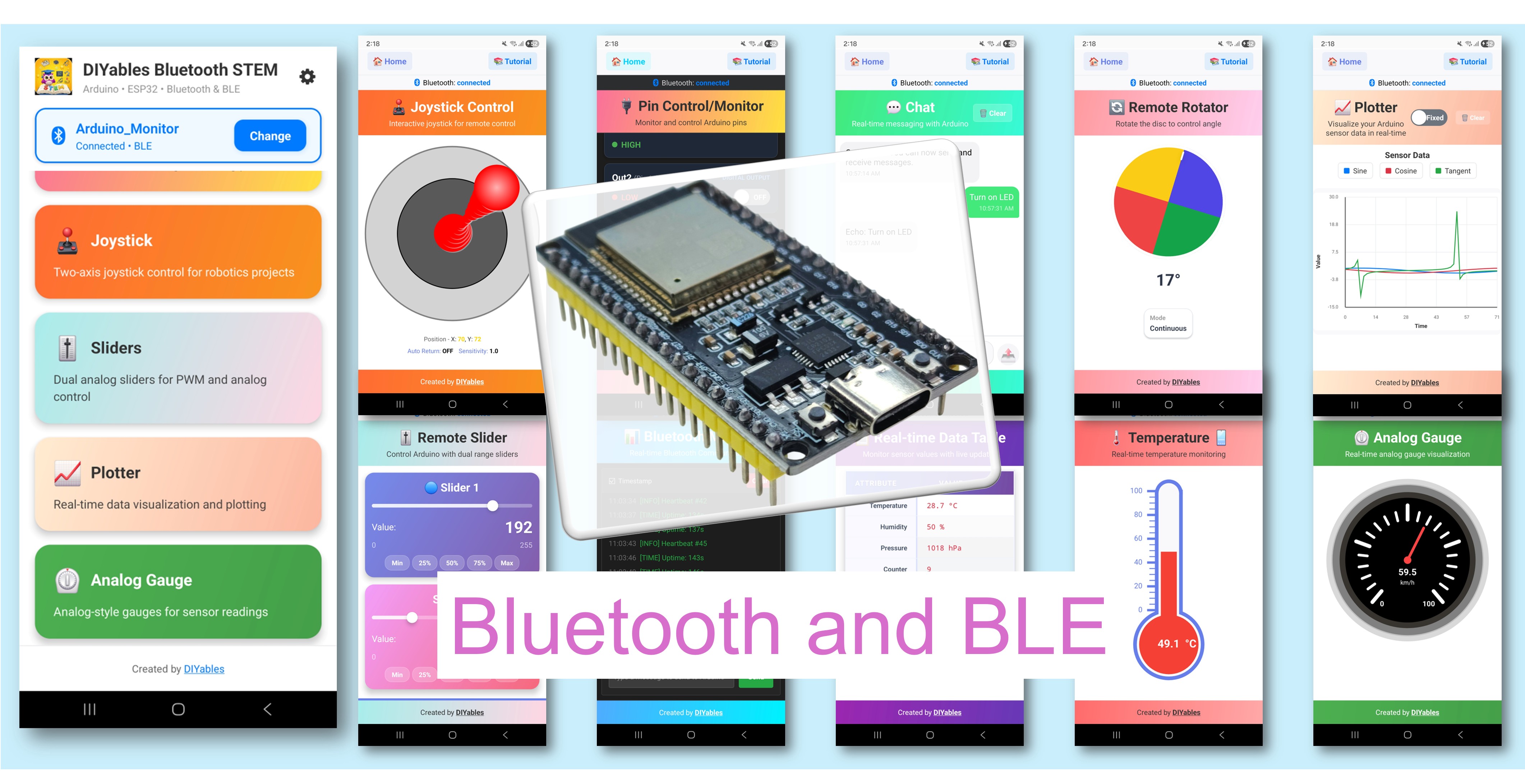
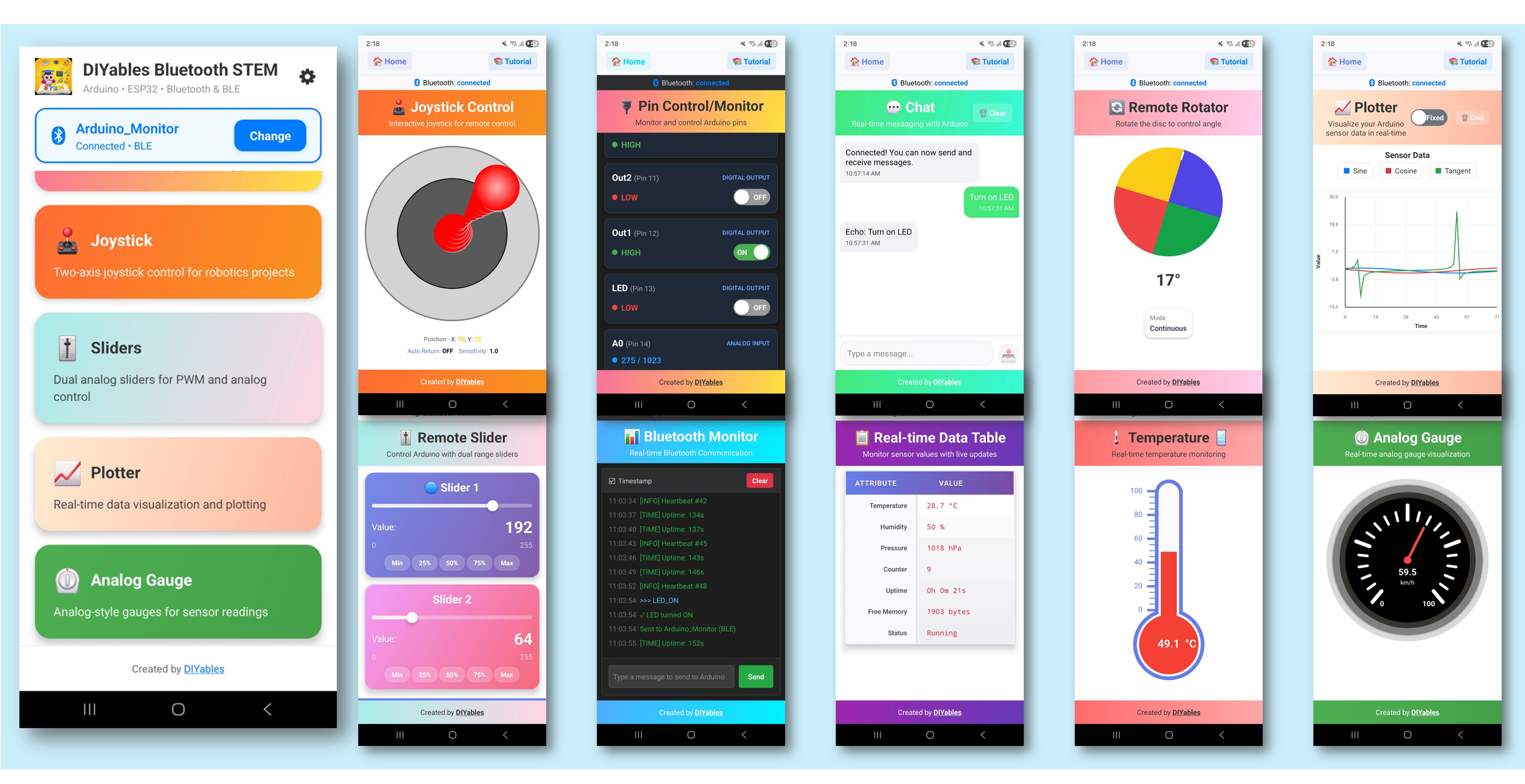
L'exemple d'applications Bluetooth multiples démontre comment combiner plusieurs interfaces d'applications Bluetooth dans un seul projet ESP32. Exécutez Monitor, Chat, Slider, Joystick, Temperature, Plotter, Table, Analog Gauge et Rotator toutes simultanément — accessibles via l'application DIYables Bluetooth STEM. Conçu pour les cartes ESP32 avec prise en charge de BLE (Bluetooth Low Energy) et des connexions Classic Bluetooth. C'est idéal pour les projets complexes nécessitant plusieurs interfaces de contrôle et d'affichage simultanément.
Cet exemple prend en charge deux modes Bluetooth :
ESP32 BLE (Bluetooth Low Energy) : Fonctionne sur Android et iOS
ESP32 Classic Bluetooth : Fonctionne sur Android uniquement. iOS ne prend pas en charge Classic Bluetooth. Utilisez BLE si vous avez besoin du support iOS.
Suivez ces instructions étape par étape :
Connectez la carte ESP32 à votre ordinateur avec un câble USB.
Lancez l'Arduino IDE sur votre ordinateur.
Sélectionnez la carte ESP32 appropriée et le port COM.
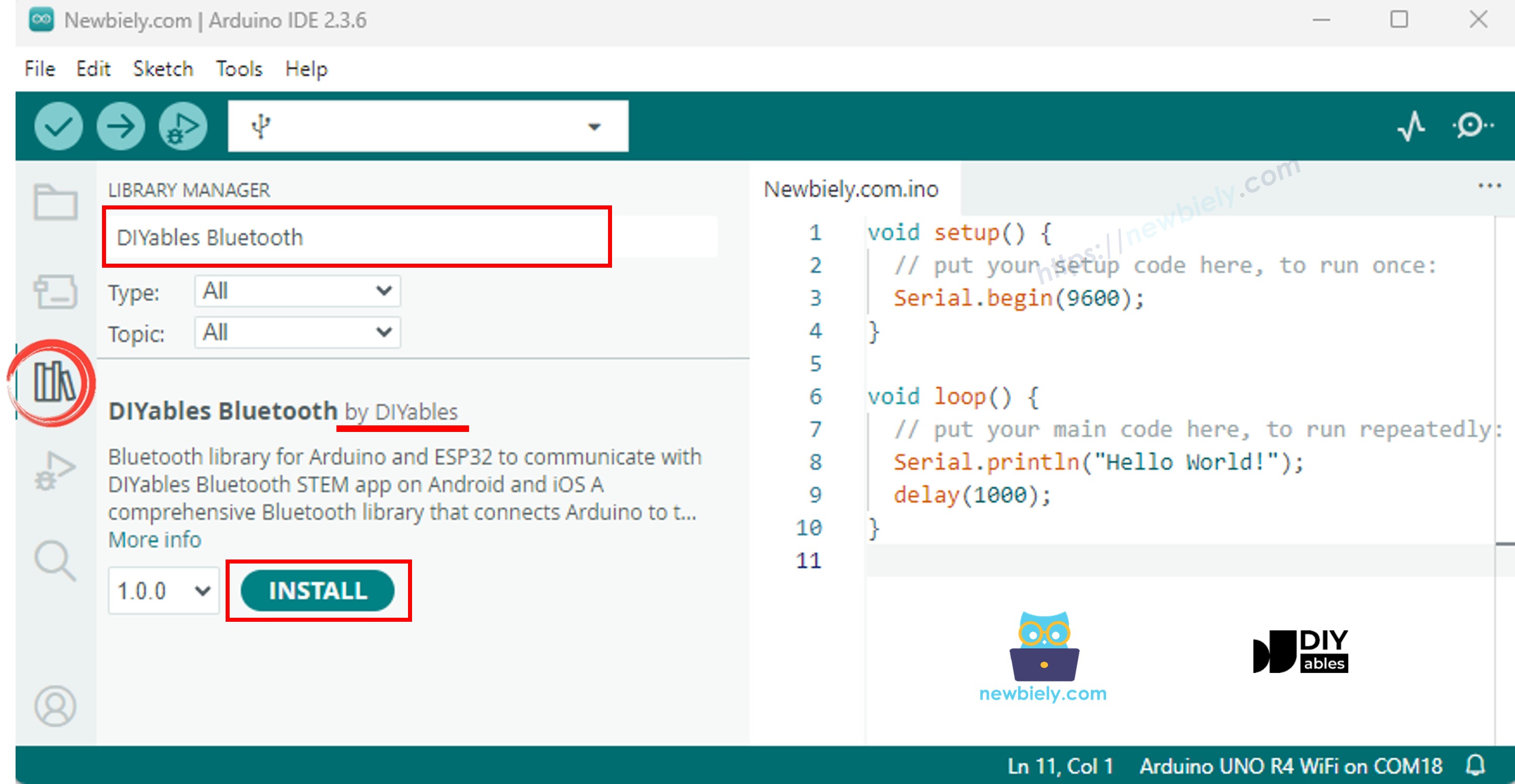
Naviguez vers l'icône Libraries dans la barre de gauche d'Arduino IDE.
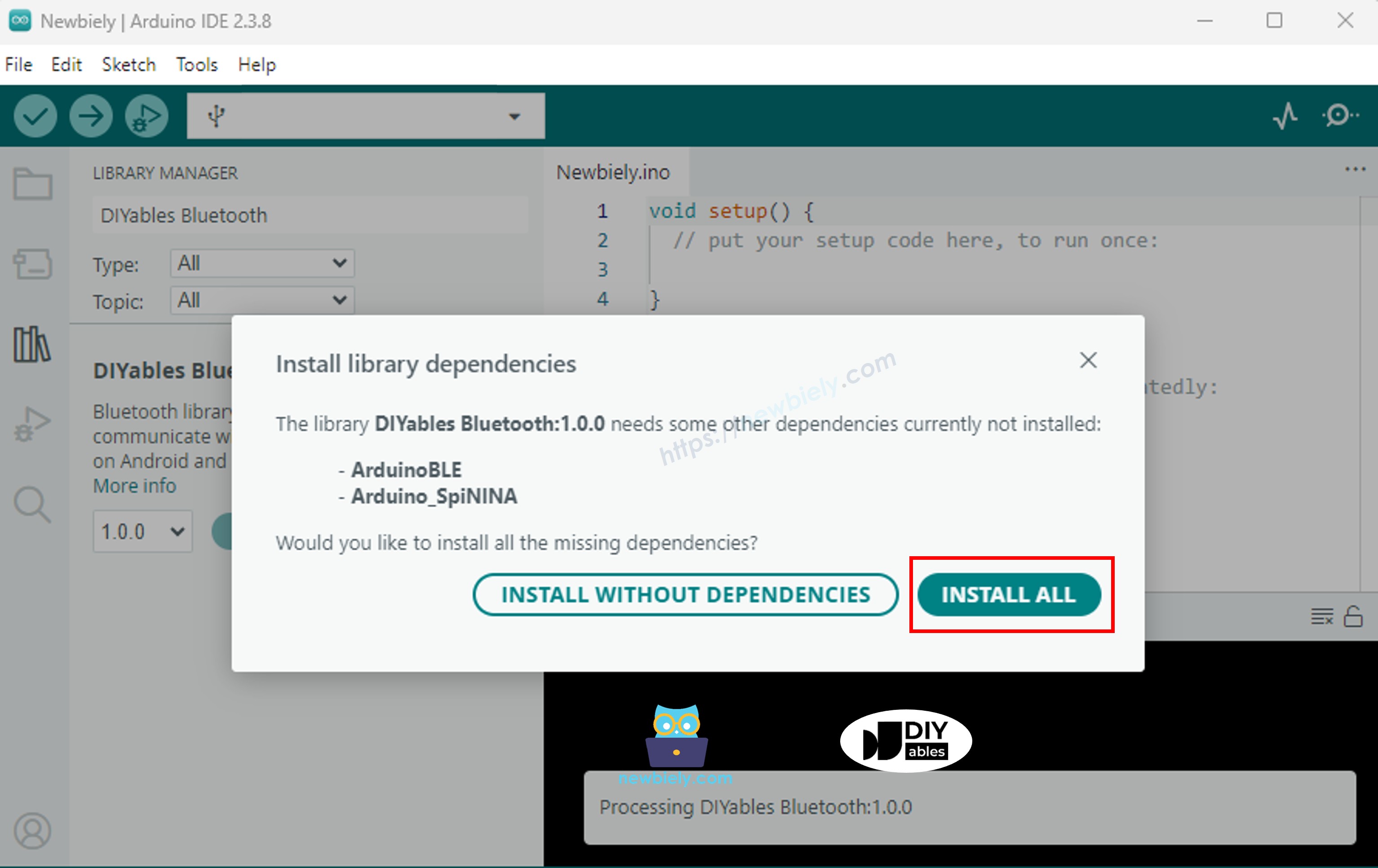
Recherchez "DIYables Bluetooth", puis trouvez la bibliothèque DIYables Bluetooth par DIYables
Cliquez sur le bouton Install pour installer la bibliothèque.
> Important : Puisque cet exemple inclut de nombreuses bibliothèques d'applications Bluetooth, le sketch compilé est plus volumineux que d'habitude. Vous devez sélectionner le schéma de partition correct (voir ci-dessous).
Choisissez l'un des deux modes Bluetooth ci-dessous selon vos besoins :
Note : Classic Bluetooth n'est PAS pris en charge sur iOS. Si vous avez besoin du support iOS, utilisez le code BLE ci-dessous.
#include <DIYables_BluetoothServer.h>
#include <DIYables_BluetoothMonitor.h>
#include <DIYables_BluetoothChat.h>
#include <DIYables_BluetoothSlider.h>
#include <DIYables_BluetoothJoystick.h>
#include <DIYables_BluetoothTemperature.h>
#include <DIYables_BluetoothPlotter.h>
#include <DIYables_BluetoothTable.h>
#include <DIYables_BluetoothAnalogGauge.h>
#include <DIYables_BluetoothRotator.h>
#include <platforms/DIYables_Esp32Bluetooth.h>
DIYables_Esp32Bluetooth bluetooth("ESP32 Multi-App");
DIYables_BluetoothServer bluetoothServer(bluetooth);
DIYables_BluetoothMonitor bluetoothMonitor;
DIYables_BluetoothChat bluetoothChat;
DIYables_BluetoothSlider bluetoothSlider(0, 255, 1);
DIYables_BluetoothJoystick bluetoothJoystick(false, 5);
DIYables_BluetoothTemperature bluetoothTemperature(-10.0, 50.0, "°C");
DIYables_BluetoothPlotter bluetoothPlotter;
DIYables_BluetoothTable bluetoothTable;
DIYables_BluetoothAnalogGauge bluetoothGauge(0.0, 100.0, "%");
DIYables_BluetoothRotator bluetoothRotator(ROTATOR_MODE_CONTINUOUS);
const int LED_PIN = 2;
int currentSlider1 = 128;
int currentSlider2 = 64;
int currentJoystickX = 0;
int currentJoystickY = 0;
float currentTemperature = 25.0;
float currentGaugeValue = 50.0;
float currentRotatorAngle = 0.0;
int messageCount = 0;
unsigned long lastMonitorUpdate = 0;
unsigned long lastTempUpdate = 0;
unsigned long lastPlotUpdate = 0;
unsigned long lastTableUpdate = 0;
unsigned long lastGaugeUpdate = 0;
float plotPhase = 0;
void setup() {
Serial.begin(115200);
delay(1000);
Serial.println("DIYables Bluetooth - ESP32 Multiple Apps Example");
pinMode(LED_PIN, OUTPUT);
digitalWrite(LED_PIN, LOW);
bluetoothServer.begin();
bluetoothServer.addApp(&bluetoothMonitor);
bluetoothServer.addApp(&bluetoothChat);
bluetoothServer.addApp(&bluetoothSlider);
bluetoothServer.addApp(&bluetoothJoystick);
bluetoothServer.addApp(&bluetoothTemperature);
bluetoothServer.addApp(&bluetoothPlotter);
bluetoothServer.addApp(&bluetoothTable);
bluetoothServer.addApp(&bluetoothGauge);
bluetoothServer.addApp(&bluetoothRotator);
Serial.print("Registered apps: ");
Serial.println(bluetoothServer.getAppCount());
bluetoothPlotter.setPlotTitle("Sensor Data");
bluetoothPlotter.setAxisLabels("Time", "Value");
bluetoothPlotter.setYAxisRange(-1.5, 1.5);
bluetoothPlotter.setMaxSamples(100);
bluetoothPlotter.setLegendLabels("Sine", "Cosine", "Random");
bluetoothTable.addRow("Status");
bluetoothTable.addRow("Uptime");
bluetoothTable.addRow("Slider 1");
bluetoothTable.addRow("Slider 2");
bluetoothTable.addRow("Joystick X");
bluetoothTable.addRow("Joystick Y");
bluetoothTable.addRow("Temperature");
bluetoothTable.addRow("Gauge Value");
bluetoothTable.addRow("Rotator Angle");
bluetoothTable.addRow("Free Heap");
setupCallbacks();
Serial.println("Waiting for Bluetooth connection...");
}
void setupCallbacks() {
bluetoothServer.setOnConnected([]() {
Serial.println("Bluetooth connected!");
digitalWrite(LED_PIN, HIGH);
bluetoothMonitor.send("=== ESP32 Multi-App Connected ===");
bluetoothMonitor.send("All apps are ready!");
bluetoothChat.send("Hello! ESP32 Multi-App is connected.");
});
bluetoothServer.setOnDisconnected([]() {
Serial.println("Bluetooth disconnected!");
digitalWrite(LED_PIN, LOW);
});
bluetoothMonitor.onMonitorMessage([](const String& message) {
Serial.println("Monitor cmd: " + message);
if (message == "HELP") {
bluetoothMonitor.send("Commands: STATUS, HELP, LED_ON, LED_OFF, HEAP");
} else if (message == "STATUS") {
bluetoothMonitor.send("Slider1=" + String(currentSlider1) + " Slider2=" + String(currentSlider2));
bluetoothMonitor.send("Joystick X=" + String(currentJoystickX) + " Y=" + String(currentJoystickY));
bluetoothMonitor.send("Temp=" + String(currentTemperature, 1) + "°C");
bluetoothMonitor.send("Gauge=" + String(currentGaugeValue, 1) + "%");
bluetoothMonitor.send("Rotator=" + String(currentRotatorAngle, 0) + "°");
} else if (message == "LED_ON") {
digitalWrite(LED_PIN, HIGH);
bluetoothMonitor.send("LED turned ON");
} else if (message == "LED_OFF") {
digitalWrite(LED_PIN, LOW);
bluetoothMonitor.send("LED turned OFF");
} else if (message == "HEAP") {
bluetoothMonitor.send("Free Heap: " + String(ESP.getFreeHeap()) + " bytes");
} else {
bluetoothMonitor.send("Unknown: " + message + " (type HELP)");
}
});
bluetoothChat.onChatMessage([](const String& message) {
Serial.println("Chat: " + message);
bluetoothChat.send("Echo: " + message);
if (message.equalsIgnoreCase("ping")) {
bluetoothChat.send("pong!");
} else if (message.equalsIgnoreCase("status")) {
bluetoothChat.send("Uptime: " + String(millis() / 1000) + "s, Apps: " + String(bluetoothServer.getAppCount()));
} else if (message.equalsIgnoreCase("heap")) {
bluetoothChat.send("Free heap: " + String(ESP.getFreeHeap()) + " bytes");
}
});
bluetoothSlider.onSliderValue([](int slider1, int slider2) {
currentSlider1 = slider1;
currentSlider2 = slider2;
Serial.print("Slider 1: "); Serial.print(slider1);
Serial.print(", Slider 2: "); Serial.println(slider2);
currentGaugeValue = map(slider1, 0, 255, 0, 100);
bluetoothGauge.send(currentGaugeValue);
bluetoothTable.sendValueUpdate("Slider 1", String(slider1));
bluetoothTable.sendValueUpdate("Slider 2", String(slider2));
bluetoothTable.sendValueUpdate("Gauge Value", String(currentGaugeValue, 1) + "%");
});
bluetoothSlider.onGetConfig([]() {
bluetoothSlider.send(currentSlider1, currentSlider2);
});
bluetoothJoystick.onJoystickValue([](int x, int y) {
currentJoystickX = x;
currentJoystickY = y;
Serial.print("Joystick X: "); Serial.print(x);
Serial.print(", Y: "); Serial.println(y);
bluetoothTable.sendValueUpdate("Joystick X", String(x));
bluetoothTable.sendValueUpdate("Joystick Y", String(y));
});
bluetoothJoystick.onGetConfig([]() {
bluetoothJoystick.send(currentJoystickX, currentJoystickY);
});
bluetoothTemperature.onTemperatureRequest([]() {
bluetoothTemperature.send(currentTemperature);
});
bluetoothPlotter.onDataRequest([]() {
Serial.println("Plotter data requested");
});
bluetoothTable.onDataRequest([]() {
Serial.println("Table data requested");
bluetoothTable.sendTableStructure();
updateAllTableValues();
});
bluetoothGauge.onValueRequest([]() {
bluetoothGauge.send(currentGaugeValue);
});
bluetoothRotator.onRotatorAngle([](float angle) {
currentRotatorAngle = angle;
Serial.print("Rotator: "); Serial.print(angle); Serial.println("°");
bluetoothTable.sendValueUpdate("Rotator Angle", String(angle, 0) + "°");
});
}
void updateAllTableValues() {
bluetoothTable.sendValueUpdate("Status", "Running");
unsigned long uptime = millis() / 1000;
String uptimeStr;
if (uptime >= 60) {
uptimeStr = String(uptime / 60) + "m " + String(uptime % 60) + "s";
} else {
uptimeStr = String(uptime) + "s";
}
bluetoothTable.sendValueUpdate("Uptime", uptimeStr);
bluetoothTable.sendValueUpdate("Slider 1", String(currentSlider1));
bluetoothTable.sendValueUpdate("Slider 2", String(currentSlider2));
bluetoothTable.sendValueUpdate("Joystick X", String(currentJoystickX));
bluetoothTable.sendValueUpdate("Joystick Y", String(currentJoystickY));
bluetoothTable.sendValueUpdate("Temperature", String(currentTemperature, 1) + " °C");
bluetoothTable.sendValueUpdate("Gauge Value", String(currentGaugeValue, 1) + "%");
bluetoothTable.sendValueUpdate("Rotator Angle", String(currentRotatorAngle, 0) + "°");
bluetoothTable.sendValueUpdate("Free Heap", String(ESP.getFreeHeap()) + " bytes");
}
void loop() {
bluetoothServer.loop();
if (!bluetooth.isConnected()) {
delay(10);
return;
}
if (millis() - lastMonitorUpdate >= 5000) {
lastMonitorUpdate = millis();
messageCount++;
bluetoothMonitor.send("[INFO] Heartbeat #" + String(messageCount) + " - Uptime: " + String(millis() / 1000) + "s");
}
if (millis() - lastTempUpdate >= 2000) {
lastTempUpdate = millis();
static float tempOffset = 0;
tempOffset += random(-10, 11) / 10.0;
if (tempOffset > 5.0) tempOffset = 5.0;
if (tempOffset < -5.0) tempOffset = -5.0;
currentTemperature = 25.0 + tempOffset;
bluetoothTemperature.send(currentTemperature);
bluetoothTable.sendValueUpdate("Temperature", String(currentTemperature, 1) + " °C");
}
if (millis() - lastPlotUpdate >= 100) {
lastPlotUpdate = millis();
float sine = sin(plotPhase);
float cosine = cos(plotPhase);
float noise = random(-50, 51) / 100.0;
bluetoothPlotter.send(sine, cosine, noise);
plotPhase += 0.1;
if (plotPhase > 2 * PI) plotPhase = 0;
}
if (millis() - lastTableUpdate >= 5000) {
lastTableUpdate = millis();
unsigned long uptime = millis() / 1000;
String uptimeStr;
if (uptime >= 60) {
uptimeStr = String(uptime / 60) + "m " + String(uptime % 60) + "s";
} else {
uptimeStr = String(uptime) + "s";
}
bluetoothTable.sendValueUpdate("Uptime", uptimeStr);
bluetoothTable.sendValueUpdate("Free Heap", String(ESP.getFreeHeap()) + " bytes");
}
if (millis() - lastGaugeUpdate >= 3000) {
lastGaugeUpdate = millis();
float sensorValue = 50.0 + 30.0 * sin(millis() / 10000.0);
currentGaugeValue = sensorValue;
bluetoothGauge.send(currentGaugeValue);
bluetoothTable.sendValueUpdate("Gauge Value", String(currentGaugeValue, 1) + "%");
}
delay(10);
}
Important : Allez à Tools > Partition Scheme et sélectionnez "Huge APP (3MB No OTA/1MB SPIFFS)". Ceci est requis car l'exemple d'applications multiples utilise significativement plus d'espace flash.
Cliquez sur le bouton Upload dans Arduino IDE pour télécharger le code vers l'ESP32
Ouvrez le Serial Monitor
Vérifiez le résultat dans le Serial Monitor. Cela ressemble à ceci :
DIYables Bluetooth - ESP32 Multiple Apps Example
Waiting for Bluetooth connection...
#include <DIYables_BluetoothServer.h>
#include <DIYables_BluetoothMonitor.h>
#include <DIYables_BluetoothChat.h>
#include <DIYables_BluetoothSlider.h>
#include <DIYables_BluetoothJoystick.h>
#include <DIYables_BluetoothTemperature.h>
#include <DIYables_BluetoothPlotter.h>
#include <DIYables_BluetoothTable.h>
#include <DIYables_BluetoothAnalogGauge.h>
#include <DIYables_BluetoothRotator.h>
#include <platforms/DIYables_Esp32BLE.h>
const char* DEVICE_NAME = "ESP32BLE Multi-App";
const char* SERVICE_UUID = "19B10000-E8F2-537E-4F6C-D104768A1214";
const char* TX_UUID = "19B10001-E8F2-537E-4F6C-D104768A1214";
const char* RX_UUID = "19B10002-E8F2-537E-4F6C-D104768A1214";
DIYables_Esp32BLE bluetooth(DEVICE_NAME, SERVICE_UUID, TX_UUID, RX_UUID);
DIYables_BluetoothServer bluetoothServer(bluetooth);
DIYables_BluetoothMonitor bluetoothMonitor;
DIYables_BluetoothChat bluetoothChat;
DIYables_BluetoothSlider bluetoothSlider(0, 255, 1);
DIYables_BluetoothJoystick bluetoothJoystick(false, 5);
DIYables_BluetoothTemperature bluetoothTemperature(-10.0, 50.0, "°C");
DIYables_BluetoothPlotter bluetoothPlotter;
DIYables_BluetoothTable bluetoothTable;
DIYables_BluetoothAnalogGauge bluetoothGauge(0.0, 100.0, "%");
DIYables_BluetoothRotator bluetoothRotator(ROTATOR_MODE_CONTINUOUS);
int currentSlider1 = 128;
int currentSlider2 = 64;
int currentJoystickX = 0;
int currentJoystickY = 0;
float currentTemperature = 25.0;
float currentGaugeValue = 50.0;
float currentRotatorAngle = 0.0;
int messageCount = 0;
unsigned long lastMonitorUpdate = 0;
unsigned long lastTempUpdate = 0;
unsigned long lastPlotUpdate = 0;
unsigned long lastTableUpdate = 0;
unsigned long lastGaugeUpdate = 0;
float plotPhase = 0;
void setup() {
Serial.begin(115200);
delay(1000);
Serial.println("DIYables Bluetooth - ESP32 BLE Multiple Apps Example");
pinMode(2, OUTPUT);
digitalWrite(2, LOW);
bluetoothServer.begin();
bluetoothServer.addApp(&bluetoothMonitor);
bluetoothServer.addApp(&bluetoothChat);
bluetoothServer.addApp(&bluetoothSlider);
bluetoothServer.addApp(&bluetoothJoystick);
bluetoothServer.addApp(&bluetoothTemperature);
bluetoothServer.addApp(&bluetoothPlotter);
bluetoothServer.addApp(&bluetoothTable);
bluetoothServer.addApp(&bluetoothGauge);
bluetoothServer.addApp(&bluetoothRotator);
Serial.print("Registered apps: ");
Serial.println(bluetoothServer.getAppCount());
bluetoothPlotter.setPlotTitle("Sensor Data");
bluetoothPlotter.setAxisLabels("Time", "Value");
bluetoothPlotter.setYAxisRange(-1.5, 1.5);
bluetoothPlotter.setMaxSamples(100);
bluetoothPlotter.setLegendLabels("Sine", "Cosine", "Random");
bluetoothTable.addRow("Status");
bluetoothTable.addRow("Uptime");
bluetoothTable.addRow("Slider 1");
bluetoothTable.addRow("Slider 2");
bluetoothTable.addRow("Joystick X");
bluetoothTable.addRow("Joystick Y");
bluetoothTable.addRow("Temperature");
bluetoothTable.addRow("Gauge Value");
bluetoothTable.addRow("Rotator Angle");
bluetoothTable.addRow("Messages");
setupCallbacks();
Serial.println("Waiting for Bluetooth connection...");
}
void setupCallbacks() {
bluetoothServer.setOnConnected([]() {
Serial.println("Bluetooth connected!");
digitalWrite(2, HIGH);
bluetoothMonitor.send("=== ESP32 BLE Multi-App Connected ===");
bluetoothMonitor.send("All apps are ready!");
bluetoothChat.send("Hello! ESP32 BLE Multi-App is connected.");
});
bluetoothServer.setOnDisconnected([]() {
Serial.println("Bluetooth disconnected!");
digitalWrite(2, LOW);
});
bluetoothMonitor.onMonitorMessage([](const String& message) {
Serial.println("Monitor cmd: " + message);
if (message == "HELP") {
bluetoothMonitor.send("Commands: STATUS, HELP, LED_ON, LED_OFF, HEAP");
} else if (message == "STATUS") {
bluetoothMonitor.send("Slider1=" + String(currentSlider1) + " Slider2=" + String(currentSlider2));
bluetoothMonitor.send("Joystick X=" + String(currentJoystickX) + " Y=" + String(currentJoystickY));
bluetoothMonitor.send("Temp=" + String(currentTemperature, 1) + "°C");
bluetoothMonitor.send("Gauge=" + String(currentGaugeValue, 1) + "%");
bluetoothMonitor.send("Rotator=" + String(currentRotatorAngle, 0) + "°");
} else if (message == "LED_ON") {
digitalWrite(2, HIGH);
bluetoothMonitor.send("LED turned ON");
} else if (message == "LED_OFF") {
digitalWrite(2, LOW);
bluetoothMonitor.send("LED turned OFF");
} else if (message == "HEAP") {
bluetoothMonitor.send("Free heap: " + String(ESP.getFreeHeap()) + " bytes");
} else {
bluetoothMonitor.send("Unknown: " + message + " (type HELP)");
}
});
bluetoothChat.onChatMessage([](const String& message) {
Serial.println("Chat: " + message);
bluetoothChat.send("Echo: " + message);
if (message.equalsIgnoreCase("ping")) {
bluetoothChat.send("pong!");
} else if (message.equalsIgnoreCase("status")) {
bluetoothChat.send("Uptime: " + String(millis() / 1000) + "s, Apps: " + String(bluetoothServer.getAppCount()));
}
});
bluetoothSlider.onSliderValue([](int slider1, int slider2) {
currentSlider1 = slider1;
currentSlider2 = slider2;
Serial.print("Slider 1: "); Serial.print(slider1);
Serial.print(", Slider 2: "); Serial.println(slider2);
currentGaugeValue = map(slider1, 0, 255, 0, 100);
bluetoothGauge.send(currentGaugeValue);
bluetoothTable.sendValueUpdate("Slider 1", String(slider1));
bluetoothTable.sendValueUpdate("Slider 2", String(slider2));
bluetoothTable.sendValueUpdate("Gauge Value", String(currentGaugeValue, 1) + "%");
});
bluetoothSlider.onGetConfig([]() {
bluetoothSlider.send(currentSlider1, currentSlider2);
});
bluetoothJoystick.onJoystickValue([](int x, int y) {
currentJoystickX = x;
currentJoystickY = y;
Serial.print("Joystick X: "); Serial.print(x);
Serial.print(", Y: "); Serial.println(y);
bluetoothTable.sendValueUpdate("Joystick X", String(x));
bluetoothTable.sendValueUpdate("Joystick Y", String(y));
});
bluetoothJoystick.onGetConfig([]() {
bluetoothJoystick.send(currentJoystickX, currentJoystickY);
});
bluetoothTemperature.onTemperatureRequest([]() {
bluetoothTemperature.send(currentTemperature);
});
bluetoothPlotter.onDataRequest([]() {
Serial.println("Plotter data requested");
});
bluetoothTable.onDataRequest([]() {
Serial.println("Table data requested");
bluetoothTable.sendTableStructure();
updateAllTableValues();
});
bluetoothGauge.onValueRequest([]() {
bluetoothGauge.send(currentGaugeValue);
});
bluetoothRotator.onRotatorAngle([](float angle) {
currentRotatorAngle = angle;
Serial.print("Rotator: "); Serial.print(angle); Serial.println("°");
bluetoothTable.sendValueUpdate("Rotator Angle", String(angle, 0) + "°");
});
}
void updateAllTableValues() {
bluetoothTable.sendValueUpdate("Status", "Running");
unsigned long uptime = millis() / 1000;
String uptimeStr;
if (uptime >= 60) {
uptimeStr = String(uptime / 60) + "m " + String(uptime % 60) + "s";
} else {
uptimeStr = String(uptime) + "s";
}
bluetoothTable.sendValueUpdate("Uptime", uptimeStr);
bluetoothTable.sendValueUpdate("Slider 1", String(currentSlider1));
bluetoothTable.sendValueUpdate("Slider 2", String(currentSlider2));
bluetoothTable.sendValueUpdate("Joystick X", String(currentJoystickX));
bluetoothTable.sendValueUpdate("Joystick Y", String(currentJoystickY));
bluetoothTable.sendValueUpdate("Temperature", String(currentTemperature, 1) + " °C");
bluetoothTable.sendValueUpdate("Gauge Value", String(currentGaugeValue, 1) + "%");
bluetoothTable.sendValueUpdate("Rotator Angle", String(currentRotatorAngle, 0) + "°");
bluetoothTable.sendValueUpdate("Messages", String(messageCount));
}
void loop() {
bluetoothServer.loop();
if (!bluetooth.isConnected()) {
delay(10);
return;
}
if (millis() - lastMonitorUpdate >= 5000) {
lastMonitorUpdate = millis();
messageCount++;
bluetoothMonitor.send("[INFO] Heartbeat #" + String(messageCount) + " - Uptime: " + String(millis() / 1000) + "s");
}
if (millis() - lastTempUpdate >= 2000) {
lastTempUpdate = millis();
static float tempOffset = 0;
tempOffset += random(-10, 11) / 10.0;
if (tempOffset > 5.0) tempOffset = 5.0;
if (tempOffset < -5.0) tempOffset = -5.0;
currentTemperature = 25.0 + tempOffset;
bluetoothTemperature.send(currentTemperature);
bluetoothTable.sendValueUpdate("Temperature", String(currentTemperature, 1) + " °C");
}
if (millis() - lastPlotUpdate >= 100) {
lastPlotUpdate = millis();
float sine = sin(plotPhase);
float cosine = cos(plotPhase);
float noise = random(-50, 51) / 100.0;
bluetoothPlotter.send(sine, cosine, noise);
plotPhase += 0.1;
if (plotPhase > 2 * PI) plotPhase = 0;
}
if (millis() - lastTableUpdate >= 5000) {
lastTableUpdate = millis();
unsigned long uptime = millis() / 1000;
String uptimeStr;
if (uptime >= 60) {
uptimeStr = String(uptime / 60) + "m " + String(uptime % 60) + "s";
} else {
uptimeStr = String(uptime) + "s";
}
bluetoothTable.sendValueUpdate("Uptime", uptimeStr);
bluetoothTable.sendValueUpdate("Messages", String(messageCount));
}
if (millis() - lastGaugeUpdate >= 3000) {
lastGaugeUpdate = millis();
float sensorValue = 50.0 + 30.0 * sin(millis() / 10000.0);
currentGaugeValue = sensorValue;
bluetoothGauge.send(currentGaugeValue);
bluetoothTable.sendValueUpdate("Gauge Value", String(currentGaugeValue, 1) + "%");
}
delay(10);
}
Important : Allez à Tools > Partition Scheme et sélectionnez "Huge APP (3MB No OTA/1MB SPIFFS)". Ceci est requis car l'exemple d'applications multiples utilise significativement plus d'espace flash.
Cliquez sur le bouton Upload dans Arduino IDE pour télécharger le code vers l'ESP32
Ouvrez le Serial Monitor
Vérifiez le résultat dans le Serial Monitor. Cela ressemble à ceci :
DIYables Bluetooth - ESP32 BLE Multiple Apps Example
Waiting for Bluetooth connection...
Installez l'application DIYables Bluetooth sur votre smartphone :
Android |
iOS
Si vous utilisez le code ESP32 Classic Bluetooth, vous devez appairer l'ESP32 avec votre téléphone Android avant d'ouvrir l'application :
Allez dans les Paramètres > Bluetooth de votre téléphone
Assurez-vous que le Bluetooth est activé
Votre téléphone recherchera les appareils disponibles
Trouvez et appuyez sur "ESP32 Multi-App" dans la liste des appareils disponibles
Confirmez la demande d'appairage (aucun PIN requis)
Attendez jusqu'à ce que cela affiche "Paired" sous le nom de l'appareil
Si vous utilisez le code ESP32 BLE, aucun appairage n'est nécessaire. Passez simplement à l'étape suivante.
Ouvrez l'application DIYables Bluetooth
Lors de la première ouverture de l'application, elle demandera des autorisations. Veuillez accorder les autorisations suivantes :
Autorisation Appareils à proximité (Android 12+) / autorisation Bluetooth (iOS) - requis pour scanner et se connecter aux appareils Bluetooth
Autorisation de localisation (Android 11 et antérieurs uniquement) - requis par les anciennes versions Android pour scanner les appareils BLE
Assurez-vous que le Bluetooth est activé sur votre téléphone
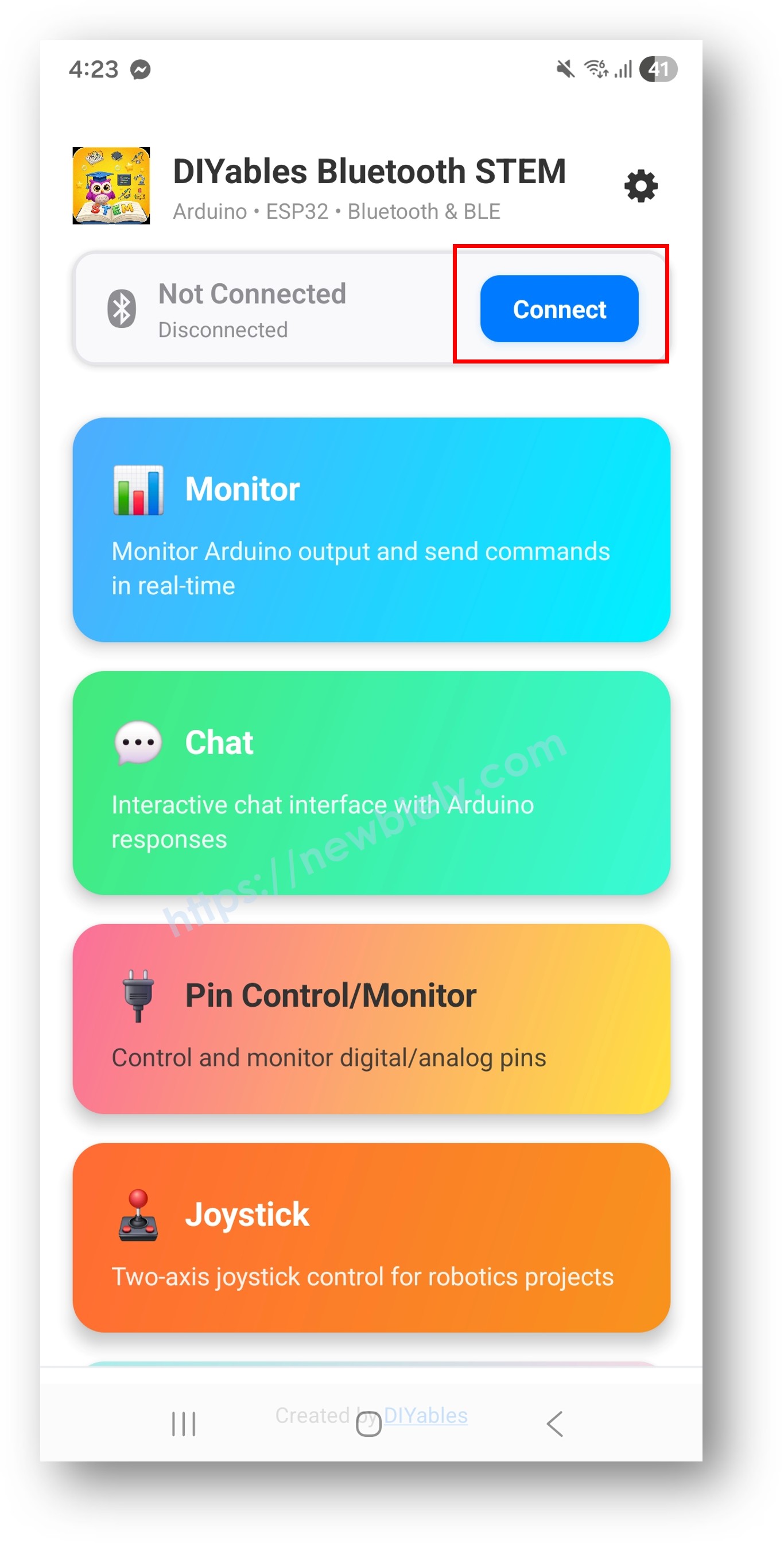
Sur l'écran d'accueil, appuyez sur le bouton Connect. L'application recherchera les appareils BLE et Classic Bluetooth.

Trouvez et appuyez sur votre appareil dans les résultats de scan pour vous connecter :
Une fois connecté, l'application revient automatiquement à l'écran d'accueil. L'écran d'accueil montre toutes les applications disponibles. Les 9 applications initialisées dans le code Arduino répondront et fonctionneront — les autres applications sur l'écran d'accueil apparaîtront mais ne fonctionneront pas avec ce sketch.
Note : Vous pouvez appuyer sur l'icône des paramètres sur l'écran d'accueil pour masquer/afficher les applications sur l'écran d'accueil. Pour plus de détails, consultez le Manuel d'utilisation de l'application DIYables Bluetooth.
Appuyez sur certaines des applications suivantes pour les ouvrir et interagir avec l'ESP32 : Monitor, Chat, Slider, Joystick, Temperature, Plotter, Table, Analog Gauge, Rotator
Basculez librement entre les applications — elles partagent toutes la même connexion Bluetooth
Maintenant regardez le Serial Monitor dans Arduino IDE. Vous verrez :
Bluetooth connected!
Monitor: Uptime: 5s | Free heap: 245780 bytes
Temperature: 25.3°C
Plotter values sent
Table values updated
Gauge value: 50.0
Chaque application est créée comme un objet séparé et enregistrée avec le même serveur Bluetooth. Elles partagent la connexion Bluetooth unique mais fonctionnent indépendamment :
#include <DIYables_BluetoothMonitor.h>
#include <DIYables_BluetoothChat.h>
#include <DIYables_BluetoothSlider.h>
#include <DIYables_BluetoothJoystick.h>
#include <DIYables_BluetoothTemperature.h>
#include <DIYables_BluetoothPlotter.h>
#include <DIYables_BluetoothTable.h>
#include <DIYables_BluetoothAnalogGauge.h>
#include <DIYables_BluetoothRotator.h>
DIYables_BluetoothMonitor bluetoothMonitor;
DIYables_BluetoothChat bluetoothChat;
DIYables_BluetoothSlider bluetoothSlider(0, 100, 1);
DIYables_BluetoothJoystick bluetoothJoystick;
DIYables_BluetoothTemperature bluetoothTemperature(-10.0, 50.0, "°C");
DIYables_BluetoothPlotter bluetoothPlotter;
DIYables_BluetoothTable bluetoothTable;
DIYables_BluetoothAnalogGauge bluetoothGauge(0.0, 100.0, "km/h");
DIYables_BluetoothRotator bluetoothRotator(ROTATOR_MODE_LIMITED, 0, 180);
bluetoothServer.addApp(bluetoothMonitor);
bluetoothServer.addApp(bluetoothChat);
bluetoothServer.addApp(bluetoothSlider);
bluetoothServer.addApp(bluetoothJoystick);
bluetoothServer.addApp(bluetoothTemperature);
bluetoothServer.addApp(bluetoothPlotter);
bluetoothServer.addApp(bluetoothTable);
bluetoothServer.addApp(bluetoothGauge);
bluetoothServer.addApp(bluetoothRotator);
Chaque application a ses propres gestionnaires d'événements :
void setup() {
bluetoothMonitor.onMonitorMessage([](String message) {
Serial.println("Monitor received: " + message);
});
bluetoothChat.onChatMessage([](String message) {
Serial.println("Chat: " + message);
bluetoothChat.send("Echo: " + message);
});
bluetoothSlider.onSliderValue([](int slider1, int slider2) {
Serial.println("Slider: " + String(slider1));
});
bluetoothJoystick.onJoystickValue([](int x, int y) {
Serial.println("Joystick: X=" + String(x) + " Y=" + String(y));
});
bluetoothRotator.onRotatorAngle([](float angle) {
Serial.println("Rotator: " + String(angle) + "°");
});
}
Chaque application peut avoir son propre timing de mise à jour :
void loop() {
bluetoothServer.loop();
unsigned long now = millis();
static unsigned long lastMonitor = 0;
if (now - lastMonitor >= 5000) {
lastMonitor = now;
bluetoothMonitor.send("Uptime: " + String(now / 1000) + "s");
}
static unsigned long lastTemp = 0;
if (now - lastTemp >= 2000) {
lastTemp = now;
bluetoothTemperature.send(readTemperature());
}
static unsigned long lastPlotter = 0;
if (now - lastPlotter >= 100) {
lastPlotter = now;
bluetoothPlotter.send(readSensorValue());
}
static unsigned long lastTable = 0;
if (now - lastTable >= 5000) {
lastTable = now;
updateTableValues();
}
static unsigned long lastGauge = 0;
if (now - lastGauge >= 3000) {
lastGauge = now;
bluetoothGauge.send(readGaugeValue());
}
delay(10);
}
Vous n'êtes pas obligé d'inclure les 9 applications. Choisissez seulement celles dont vous avez besoin :
#include <DIYables_BluetoothMonitor.h>
#include <DIYables_BluetoothSlider.h>
#include <DIYables_BluetoothTemperature.h>
DIYables_BluetoothMonitor bluetoothMonitor;
DIYables_BluetoothSlider bluetoothSlider(0, 100, 1);
DIYables_BluetoothTemperature bluetoothTemperature(-10.0, 50.0, "°C");
void setup() {
bluetoothServer.addApp(bluetoothMonitor);
bluetoothServer.addApp(bluetoothSlider);
bluetoothServer.addApp(bluetoothTemperature);
}
bluetoothServer.setOnConnected([]() {
Serial.println("Bluetooth connected!");
bluetoothTemperature.send(currentTemperature);
bluetoothGauge.send(currentGaugeValue);
bluetoothRotator.send(currentAngle);
});
bluetoothServer.setOnDisconnected([]() {
Serial.println("Bluetooth disconnected!");
});
DIYables_BluetoothTemperature bluetoothTemperature(-10.0, 50.0, "°C");
DIYables_BluetoothTable bluetoothTable;
DIYables_BluetoothPlotter bluetoothPlotter;
DIYables_BluetoothMonitor bluetoothMonitor;
void setup() {
bluetoothTable.addRow("Temperature");
bluetoothTable.addRow("Humidity");
bluetoothTable.addRow("Pressure");
bluetoothTable.addRow("Wind Speed");
bluetoothTable.addRow("Rain");
bluetoothPlotter.setPlotTitle("Weather Trends");
bluetoothPlotter.setLegendLabels("Temp", "Humidity", "Pressure");
}
void loop() {
bluetoothServer.loop();
static unsigned long lastUpdate = 0;
if (millis() - lastUpdate >= 2000) {
lastUpdate = millis();
float temp = readTemperature();
float hum = readHumidity();
float press = readPressure();
bluetoothTemperature.send(temp);
bluetoothTable.sendValueUpdate("Temperature", String(temp, 1) + " °C");
bluetoothTable.sendValueUpdate("Humidity", String(hum, 0) + "%");
bluetoothTable.sendValueUpdate("Pressure", String(press, 0) + " hPa");
bluetoothPlotter.send(temp, hum, press / 10.0);
bluetoothMonitor.send("Weather update: " + String(temp, 1) + "°C, " + String(hum, 0) + "%, " + String(press, 0) + "hPa");
}
delay(10);
}
DIYables_BluetoothJoystick bluetoothJoystick;
DIYables_BluetoothSlider bluetoothSlider(0, 100, 5);
DIYables_BluetoothRotator bluetoothRotator(ROTATOR_MODE_LIMITED, 0, 180);
DIYables_BluetoothMonitor bluetoothMonitor;
DIYables_BluetoothAnalogGauge bluetoothGauge(0.0, 100.0, "%");
int maxSpeed = 50;
void setup() {
bluetoothSlider.onSliderValue([](int slider1, int slider2) {
maxSpeed = slider1;
bluetoothMonitor.send("Max speed set to: " + String(maxSpeed) + "%");
});
bluetoothJoystick.onJoystickValue([](int x, int y) {
int leftMotor = constrain(y + x, -maxSpeed, maxSpeed);
int rightMotor = constrain(y - x, -maxSpeed, maxSpeed);
setMotors(leftMotor, rightMotor);
bluetoothMonitor.send("Motors: L=" + String(leftMotor) + " R=" + String(rightMotor));
});
bluetoothRotator.onRotatorAngle([](float angle) {
setArmAngle((int)angle);
bluetoothMonitor.send("Arm angle: " + String((int)angle) + "°");
});
}
void loop() {
bluetoothServer.loop();
static unsigned long lastBattery = 0;
if (millis() - lastBattery >= 10000) {
lastBattery = millis();
float battery = readBatteryLevel();
bluetoothGauge.send(battery);
}
delay(10);
}
DIYables_BluetoothChat bluetoothChat;
DIYables_BluetoothSlider bluetoothSlider(0, 100, 1);
DIYables_BluetoothTable bluetoothTable;
DIYables_BluetoothTemperature bluetoothTemperature(10.0, 40.0, "°C");
DIYables_BluetoothMonitor bluetoothMonitor;
void setup() {
bluetoothTable.addRow("Living Room Light");
bluetoothTable.addRow("Bedroom Light");
bluetoothTable.addRow("AC Status");
bluetoothTable.addRow("Door Lock");
bluetoothTable.addRow("Security");
bluetoothChat.onChatMessage([](String message) {
message.toLowerCase();
if (message == "lights on") {
setLights(true);
bluetoothChat.send("Lights turned ON");
bluetoothTable.sendValueUpdate("Living Room Light", "ON ?");
} else if (message == "lights off") {
setLights(false);
bluetoothChat.send("Lights turned OFF");
bluetoothTable.sendValueUpdate("Living Room Light", "OFF ?");
} else if (message == "status") {
bluetoothChat.send("Temp: " + String(readTemperature(), 1) + "°C");
bluetoothChat.send("All systems normal");
}
bluetoothMonitor.send("[CMD] " + message);
});
bluetoothSlider.onSliderValue([](int slider1, int slider2) {
setDimmer(slider1);
bluetoothMonitor.send("[DIMMER] Set to " + String(slider1) + "%");
});
}
Utilisez les données d'une application pour mettre à jour une autre :
float posX = 0, posY = 0;
bluetoothJoystick.onJoystickValue([](int x, int y) {
posX += x * 0.1;
posY += y * 0.1;
bluetoothPlotter.send(posX, posY);
bluetoothTable.sendValueUpdate("Position X", String(posX, 1));
bluetoothTable.sendValueUpdate("Position Y", String(posY, 1));
bluetoothMonitor.send("Pos: (" + String(posX, 1) + ", " + String(posY, 1) + ")");
});
Lorsque la mémoire est limitée, partagez les variables entre les applications :
struct SensorData {
float temperature;
float humidity;
float pressure;
unsigned long lastUpdate;
} sensorData;
void readAllSensors() {
sensorData.temperature = readTemperature();
sensorData.humidity = readHumidity();
sensorData.pressure = readPressure();
sensorData.lastUpdate = millis();
}
void updateAllApps() {
readAllSensors();
bluetoothTemperature.send(sensorData.temperature);
bluetoothTable.sendValueUpdate("Temperature", String(sensorData.temperature, 1) + " °C");
bluetoothTable.sendValueUpdate("Humidity", String(sensorData.humidity, 0) + "%");
bluetoothPlotter.send(sensorData.temperature, sensorData.humidity);
bluetoothGauge.send(sensorData.pressure);
bluetoothMonitor.send("Sensors updated at " + String(sensorData.lastUpdate / 1000) + "s");
}
| Fonctionnalité | BLE (Esp32BLE_MultipleApps) | Classic Bluetooth (Esp32Bluetooth_MultipleApps) |
| Support iOS | ✅ Oui | ❌ Non |
| Support Android | ✅ Oui | ✅ Oui |
| Consommation | Faible | Plus élevée |
| Portée | ~30-100m | ~10-100m |
| Débit de Données | Plus faible | Plus élevé |
| Appairage Requis | Non (auto-connexion) | Oui (appairage manuel) |
| Idéal Pour | Alimenté par batterie, multi-plateforme | Haut débit, Android uniquement |
> Note pour les Applications Multiples : Puisque les applications multiples envoient des données simultanément, le débit plus élevé de Classic Bluetooth peut être bénéfique si vous avez de nombreuses applications à mise à jour rapide (par ex. plotter à 100ms). Pour les projets alimentés par batterie, BLE est toujours recommandé.
1. Impossible de trouver l'appareil dans l'application
Assurez-vous que l'ESP32 est alimenté et le sketch téléchargé
Pour BLE : Assurez-vous que le Bluetooth et la Localisation de votre téléphone sont activés
Pour Classic Bluetooth : Appairez d'abord l'appareil dans les paramètres Bluetooth du téléphone
Vérifiez que le schéma de partition correct est sélectionné (Huge APP) — c'est critique pour les exemples multi-applications
2. Sketch trop volumineux / pas assez d'espace
Dans Arduino IDE, allez à Tools > Partition Scheme et sélectionnez "Huge APP (3MB No OTA/1MB SPIFFS)" ou "No OTA (Large APP)"
Le schéma de partition par défaut fournit seulement ~1,2MB pour le code de l'application, ce qui n'est pas suffisant pour l'exemple multi-applications
Ce paramètre donne ~3MB en sacrifiant la partition OTA (mise à jour par liaison radio)
Si c'est encore trop volumineux, supprimez les applications dont vous n'avez pas besoin
3. Certaines applications n'apparaissent pas dans l'application mobile
Assurez-vous que chaque application est enregistrée avec bluetoothServer.addApp()
Vérifiez que les en-têtes include correspondent aux objets d'applications créés
Vérifiez que toutes les applications sont enregistrées avant bluetoothServer.begin()
4. Les mises à jour de données sont lentes ou retardées
Réduisez le nombre d'applications envoyant des données simultanément
Augmentez les intervalles de mise à jour pour les applications moins critiques
BLE a une bande passante limitée — échelonnez les mises à jour dans le temps
5. L'ESP32 plante ou redémarre
Vérifiez la mémoire heap disponible avec ESP.getFreeHeap()
Réduisez le nombre de lignes de tableau ou d'échantillons de traceur
Assurez-vous que l'alimentation est adéquate (USB 3.0 ou alimentation externe)
6. La connexion se coupe fréquemment
Rapprochez-vous de l'ESP32 (réduisez la distance)
Réduisez la quantité totale de données envoyées
Échelonnez les intervalles de mise à jour pour que les applications n'envoient pas toutes en même temps
Surveillez la mémoire et les performances :
void debugMultiApp() {
Serial.println("=== Multi-App Debug ===");
Serial.println("Free Heap: " + String(ESP.getFreeHeap()) + " bytes");
Serial.println("Min Free Heap: " + String(ESP.getMinFreeHeap()) + " bytes");
Serial.println("Uptime: " + String(millis() / 1000) + "s");
Serial.println("=======================");
}
static unsigned long lastDebug = 0;
if (millis() - lastDebug >= 30000) {
lastDebug = millis();
debugMultiApp();
}
Maintenant que vous maîtrisez la combinaison de plusieurs applications Bluetooth, vous avez tous les outils pour construire des projets ESP32 complexes avec des interfaces mobiles riches. Explorez chaque tutoriel d'application individuelle pour une connaissance approfondie de l'API :
Moniteur Bluetooth - Moniteur série basé sur texte
Chat Bluetooth - Messagerie bidirectionnelle
Curseur Bluetooth - Contrôle des valeurs avec curseurs
Joystick Bluetooth - Entrée directionnelle 2D
Température Bluetooth - Affichage de jauge de température
Traceur Bluetooth - Tracé de données en temps réel
Tableau Bluetooth - Affichage de données structurées
Jauge analogique Bluetooth - Affichage de compteur analogique
Rotateur Bluetooth - Contrôle de bouton rotatif
Pour une aide supplémentaire :