
Raspberry Pi Pico - Actionneur avec rétroaction

Dans un Raspberry Pi Pico - Actionneur., nous avons appris comment utiliser le Raspberry Pi Pico avec un actionneur linéaire sans rétroaction. Dans ce tutoriel, nous allons apprendre comment utiliser le Raspberry Pi Pico avec l'actionneur linéaire avec rétroaction. Le signal de rétroaction de l'actionneur indique sa position pendant le déplacement, ce qui nous aide à contrôler où il se dirige. Nous examinerons les détails suivants :

Préparation du matériel

1×Raspberry Pi Pico W
1×Raspberry Pi Pico Alternativement:
1×Câble Micro USB
1×Actionneur linéaire 12V avec rétroaction
1×Module pilote de moteur L298N
1×Adaptateur secteur 12V
1×Connecteur d'alimentation DC
1×Fils de connexion
1×Recommandé: Carte d'extension à bornier à vis pour Raspberry Pi Pico

Ou vous pouvez acheter les kits suivants:

1×Kit de Capteurs DIYables (30 capteurs/écrans)
1×Kit de Capteurs DIYables (18 capteurs/écrans)
Divulgation : Certains des liens fournis dans cette section sont des liens affiliés Amazon. Nous pouvons recevoir une commission pour tout achat effectué via ces liens, sans coût supplémentaire pour vous. Nous vous remercions de votre soutien.

À propos de l'actionneur linéaire à rétroaction

Un actionneur linéaire à rétroaction est un dispositif qui se déplace en ligne droite et qui comprend un système de vérification et d'ajustement de sa position. Il utilise un potentiomètre qui envoie un signal de tension correspondant à la position de l'actionneur.

Schéma de brochage de l'actionneur linéaire à rétroaction

Un actionneur linéaire à rétroaction est livré avec cinq fils.

  • Fil positif : Ce fil utilise une tension élevée (12V, 24V, 48V) pour contrôler l'actionneur linéaire.
  • Fil négatif : Ce fil utilise une tension élevée (12V, 24V, 48V) pour contrôler l'actionneur linéaire.
  • Fil 5V : Connectez ce fil au potentiomètre de rétroaction à 5V ou 3,3V.
  • Fil GND : Connectez ce fil au potentiomètre de rétroaction à la masse (GND).
  • Fil du potentiomètre : Également appelé fil de rétroaction ou de sortie, ce fil fait varier sa valeur de tension en fonction de la position de course.
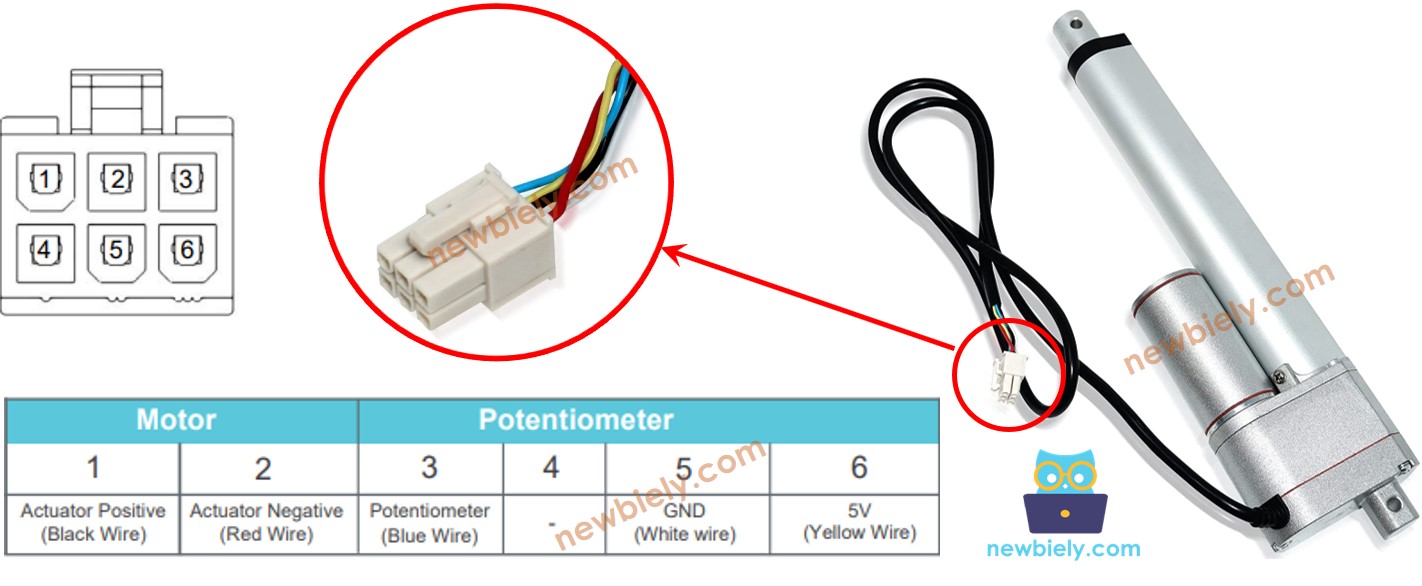
Schéma de brochage de l'actionneur linéaire à rétroaction

Comment ça fonctionne

Lorsque nous appliquons une tension élevée aux fils positifs et négatifs, l'actionneur s'allonge ou se rétracte. Pour expliquer cela, si nous connectons :

  • Connectez 12 V (ou 24 V, 48 V) au fil positif et la masse (GND) au fil négatif : l'actionneur s'étendra à sa vitesse maximale jusqu'à ce qu'il soit complètement déployé.
  • Connectez 12 V (ou 24 V, 48 V) au fil négatif et la masse (GND) au fil positif : l'actionneur se rétractera à sa vitesse maximale jusqu'à ce qu'il soit complètement rétracté.
  • Si l'alimentation de l'actionneur est coupée (en reliant la masse (GND) à ses deux fils) alors qu'il est en extension ou en rétraction, il cessera de bouger.

※ Note:

  • La tension requise pour faire fonctionner l'actionneur dépend de ses caractéristiques spécifiques. Consultez la fiche technique ou le manuel pour déterminer la tension correcte.
  • L'actionneur peut maintenir sa position sans électricité, même lorsqu'il supporte une charge.

La tension dans le fil du potentiomètre change lorsque l'actionneur se déplace. En mesurant cette tension, nous pouvons déterminer la position de la course.

Schéma de câblage

Retirez les trois cavaliers du module L298N avant de commencer le câblage.
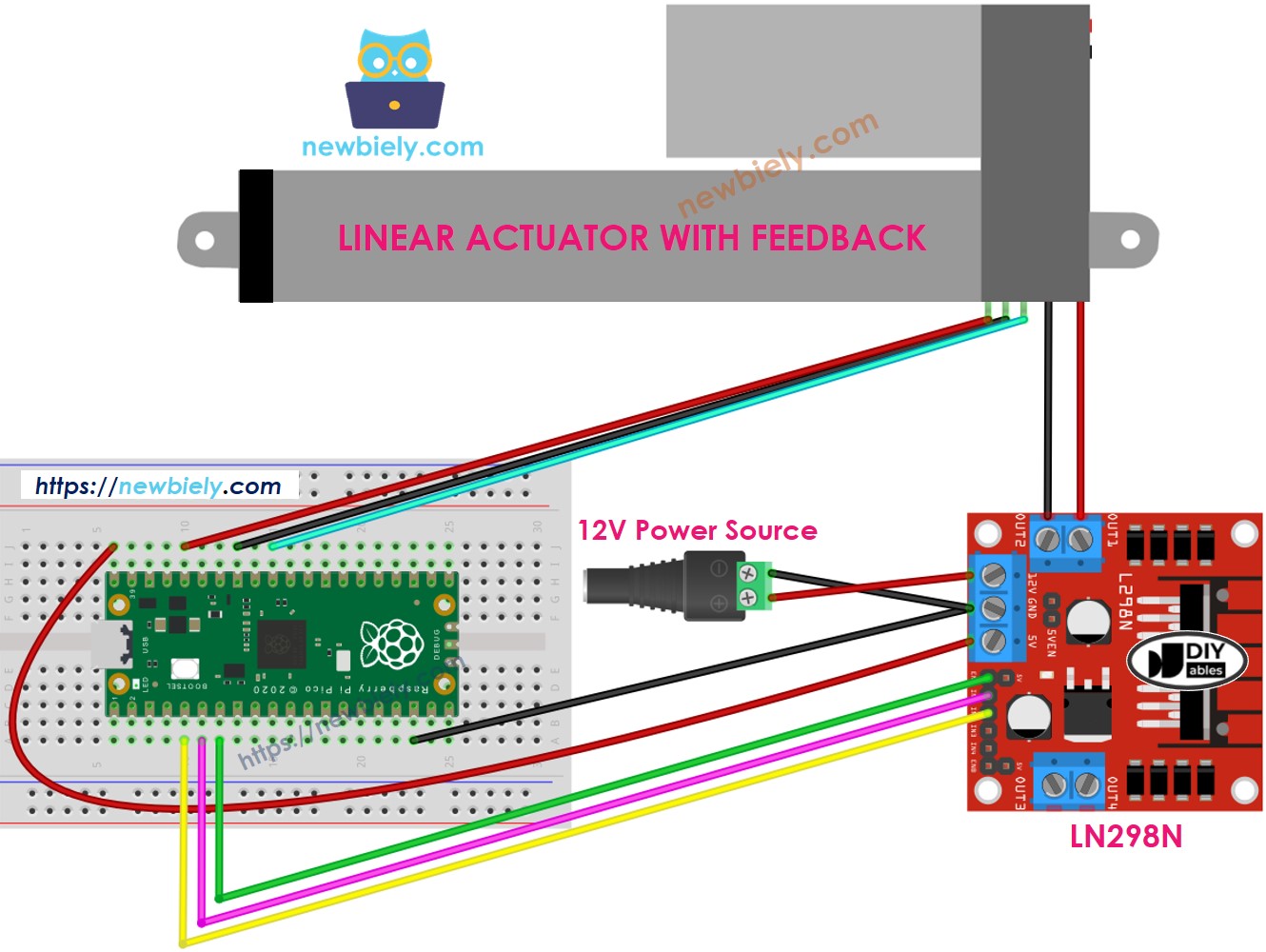
Schéma de câblage du pilote L298N pour actionneur linéaire Raspberry Pi Pico

Cette image a été créée avec Fritzing. Cliquez pour agrandir l'image.

Comment contrôler l'extension et la rétraction d'un vérin linéaire

En savoir plus sur l'actuateur Raspberry Pi Pico en cliquant Raspberry Pi Pico - Actionneur..

Comment trouver la position de l'actuateur linéaire

Voici comment localiser la position de course d'un vérin linéaire :

Étalonnage

  • Utilisez une règle pour connaître la distance parcourue par l'actionneur ou consultez la fiche technique pour plus de détails.
  • Pour voir les valeurs lorsque l'actionneur linéaire est complètement ouvert ou fermé, exécutez ce code.
/* * Ce code Raspberry Pi Pico a été développé par newbiely.fr * Ce code Raspberry Pi Pico est mis à disposition du public sans aucune restriction. * Pour des instructions complètes et des schémas de câblage, veuillez visiter: * https://newbiely.fr/tutorials/raspberry-pico/raspberry-pi-pico-actuator-with-feedback */ from machine import Pin, ADC import time # Define pins ENA_PIN = 5 # The Raspberry Pi Pico pin GP5 connected to the EN1 pin of L298N IN1_PIN = 4 # The Raspberry Pi Pico pin GP4 connected to the IN1 pin of L298N IN2_PIN = 3 # The Raspberry Pi Pico pin GP3 connected to the IN2 pin of L298N POTENTIOMETER_PIN = 26 # The Raspberry Pi Pico pin GP26 (ADC0) connected to the potentiometer of the actuator # Initialize digital pins as outputs ena = Pin(ENA_PIN, Pin.OUT) in1 = Pin(IN1_PIN, Pin.OUT) in2 = Pin(IN2_PIN, Pin.OUT) # Initialize the potentiometer as an ADC pin potentiometer = ADC(Pin(POTENTIOMETER_PIN)) # Set ENA_PIN to HIGH to enable the motor driver ena.value(1) # Main loop to extend and retract the actuator with feedback while True: # Extend the actuator in1.value(1) in2.value(0) time.sleep(20) # Wait for 20 seconds (20000 ms) # Read the potentiometer value after fully extending POTENTIOMETER_MAX = potentiometer.read_u16() print("POTENTIOMETER_MAX =", POTENTIOMETER_MAX) # Retract the actuator in1.value(0) in2.value(1) time.sleep(20) # Wait for 20 seconds (20000 ms) # Read the potentiometer value after fully retracting POTENTIOMETER_MIN = potentiometer.read_u16() print("POTENTIOMETER_MIN =", POTENTIOMETER_MIN)
  • Vous verrez l'enregistrement dans le Shell en bas de Thonny, comme dans l'exemple ci-dessous.
Shell x
>>> %Run -c $EDITOR_CONTENT
MPY: soft reboot POTENTIOMETER_MAX = 987 POTENTIOMETER_MIN = 13
MicroPython (Raspberry Pi Pico) • Board CDC @ COM29 ≡
  • Écrivez ces valeurs.
  • Si la valeur minimale est supérieure à la valeur maximale, échangez IN1_PIN avec INI2_PIN.
  • Modifiez trois valeurs dans le code ci-dessous.

Code du Raspberry Pi Pico qui calcule la position de l'actionneur

/* * Ce code Raspberry Pi Pico a été développé par newbiely.fr * Ce code Raspberry Pi Pico est mis à disposition du public sans aucune restriction. * Pour des instructions complètes et des schémas de câblage, veuillez visiter: * https://newbiely.fr/tutorials/raspberry-pico/raspberry-pi-pico-actuator-with-feedback */ from machine import Pin, ADC import time # Define pins ENA_PIN = 5 # The Raspberry Pi Pico pin GP5 connected to the EN1 pin of L298N IN1_PIN = 4 # The Raspberry Pi Pico pin GP4 connected to the IN1 pin of L298N IN2_PIN = 3 # The Raspberry Pi Pico pin GP3 connected to the IN2 pin of L298N POTENTIOMETER_PIN = 26 # The Raspberry Pi Pico pin GP26 (ADC0) connected to the potentiometer of the actuator # Define constants STROKE_LENGTH = 102 # Stroke length in millimeters POTENTIOMETER_MAX = 987 # Max potentiometer value POTENTIOMETER_MIN = 13 # Min potentiometer value # Initialize digital pins as outputs ena = Pin(ENA_PIN, Pin.OUT) in1 = Pin(IN1_PIN, Pin.OUT) in2 = Pin(IN2_PIN, Pin.OUT) # Initialize the potentiometer as an ADC pin potentiometer = ADC(Pin(POTENTIOMETER_PIN)) # Set ENA_PIN to HIGH to enable the motor driver ena.value(1) def map_value(x, in_min, in_max, out_min, out_max): # Map a value from one range to another. return int((x - in_min) * (out_max - out_min) / (in_max - in_min) + out_min) # Main loop to extend the actuator and read the stroke position while True: # Extend the actuator in1.value(1) in2.value(0) # Read the potentiometer value potentiometer_value = potentiometer.read_u16() # Map the potentiometer value to stroke position in millimeters stroke_pos = map_value(potentiometer_value, POTENTIOMETER_MIN, POTENTIOMETER_MAX, 0, STROKE_LENGTH) # Print the stroke position print("The stroke's position =", stroke_pos, "mm") time.sleep(1) # Wait for 1 second before the next reading
  • Modifier les trois valeurs altérées dans le code
  • Téléverser le code sur le Raspberry Pi Pico
  • Consultez les résultats dans le Shell en bas de Thonny
Shell x
>>> %Run -c $EDITOR_CONTENT
MPY: soft reboot The stroke's position = 2 mm The stroke's position = 35 mm The stroke's position = 43 mm The stroke's position = 60 mm The stroke's position = 68 mm The stroke's position = 79 mm The stroke's position = 83 mm The stroke's position = 96 mm The stroke's position = 100 mm
MicroPython (Raspberry Pi Pico) • Board CDC @ COM29 ≡

Comment contrôler un actionneur linéaire à une position précise

/* * Ce code Raspberry Pi Pico a été développé par newbiely.fr * Ce code Raspberry Pi Pico est mis à disposition du public sans aucune restriction. * Pour des instructions complètes et des schémas de câblage, veuillez visiter: * https://newbiely.fr/tutorials/raspberry-pico/raspberry-pi-pico-actuator-with-feedback */ from machine import Pin, ADC import time # Define pins ENA_PIN = 5 # The Raspberry Pi Pico pin GP5 connected to the EN1 pin of L298N IN1_PIN = 4 # The Raspberry Pi Pico pin GP4 connected to the IN1 pin of L298N IN2_PIN = 3 # The Raspberry Pi Pico pin GP3 connected to the IN2 pin of L298N POTENTIOMETER_PIN = 26 # The Raspberry Pi Pico pin GP26 (ADC0) connected to the potentiometer of the actuator # Define constants STROKE_LENGTH = 102 # Stroke length in millimeters POTENTIOMETER_MAX = 987 # Max potentiometer value POTENTIOMETER_MIN = 13 # Min potentiometer value TOLERANCE = 5 # Tolerance in millimeters targetPosition_mm = 50 # Target position in millimeters # Initialize digital pins as outputs ena = Pin(ENA_PIN, Pin.OUT) in1 = Pin(IN1_PIN, Pin.OUT) in2 = Pin(IN2_PIN, Pin.OUT) # Initialize the potentiometer as an ADC pin potentiometer = ADC(Pin(POTENTIOMETER_PIN)) # Set ENA_PIN to HIGH to enable the motor driver ena.value(1) def map_value(x, in_min, in_max, out_min, out_max): # Map a value from one range to another. return int((x - in_min) * (out_max - out_min) / (in_max - in_min) + out_min) def ACTUATOR_extend(): in1.value(1) in2.value(0) def ACTUATOR_retract(): in1.value(0) in2.value(1) def ACTUATOR_stop(): in1.value(0) in2.value(0) # Main loop to control the actuator while True: # Read the potentiometer value potentiometer_value = potentiometer.read_u16() # Map the potentiometer value to stroke position in millimeters stroke_pos = map_value(potentiometer_value, POTENTIOMETER_MIN, POTENTIOMETER_MAX, 0, STROKE_LENGTH) # Print the stroke position print("The stroke's position =", stroke_pos, "mm") # Control the actuator based on the target position and tolerance if stroke_pos < (targetPosition_mm - TOLERANCE): ACTUATOR_extend() elif stroke_pos > (targetPosition_mm + TOLERANCE): ACTUATOR_retract() else: ACTUATOR_stop() time.sleep(0.1) # Small delay to avoid excessive CPU usage

Vidéo

※ NOS MESSAGES

  • N'hésitez pas à partager le lien de ce tutoriel. Cependant, veuillez ne pas utiliser notre contenu sur d'autres sites web. Nous avons investi beaucoup d'efforts et de temps pour créer ce contenu, veuillez respecter notre travail !